Static IP vs Dynamic IP
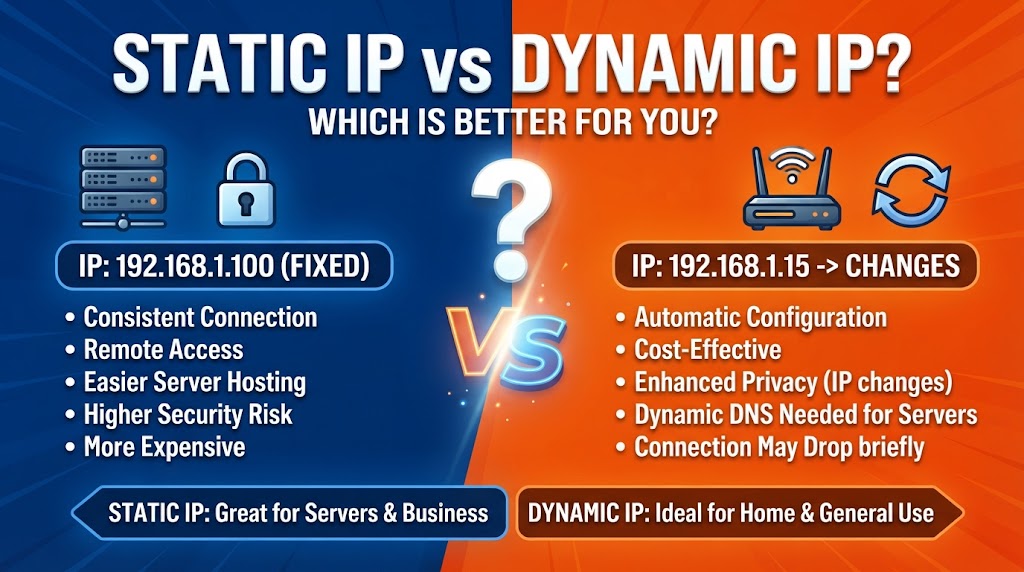
Static IP and Dynamic IP are two common ways of assigning IP addresses to devices on a network. A static IP address remains assigned to a device until it is manually changed, while a dynamic IP address is assigned automatically and may change over time.
Both approaches are useful for different networking situations. Static IP addresses can be helpful when a device needs a consistent address, such as a server, network printer, or CCTV system. Dynamic IP addresses are easier to manage and are commonly used for everyday computers, smartphones, and other devices.
Quick Comparison: Static IP vs Dynamic IP
| Feature | Static IP | Dynamic IP |
|---|---|---|
| IP Address | Usually remains the same | Can change |
| Assignment | Manual or reserved | Automatically assigned |
| Configuration | Requires more setup | Easier |
| Management | More maintenance | Easier for large networks |
| Servers | Well suited | Less convenient without additional services |
| CCTV Remote Access | Can be useful | May require DDNS or other methods |
| Security | Consistent address can simplify access rules | Changing address can make direct access less predictable |
| Cost | May cost more for public IP service | Often included with normal internet service |
| Best For | Servers and specific network devices | Everyday devices and general networking |
What Is a Static IP?
A static IP address is an IP address that is deliberately kept the same for a device or connection.
For example, a network administrator may configure a printer with a specific local IP address so that computers can always find it at the same address.
Static IP addresses can be used for servers, CCTV equipment, network storage, printers, routers, and other devices where consistent addressing is useful.
What Is a Dynamic IP?
A dynamic IP address is assigned automatically, commonly through DHCP (Dynamic Host Configuration Protocol) on a local network.
When a device connects to the network, the DHCP server can assign it an available IP address. The address may remain the same for some time, but it can change when the lease expires or the device reconnects.
This automatic process makes network management easier, especially when many devices are connected.
Static IP vs Dynamic IP: Ease of Setup
Static IP addresses require configuration. The correct IP address, subnet information, gateway, and DNS settings may need to be entered manually, depending on the network.
Dynamic IP addresses are generally easier because DHCP automatically provides the necessary network settings to compatible devices.
Advantage: Dynamic IP
Static IP vs Dynamic IP for Network Management
A static address can make certain devices easier to locate because their address does not normally change.
However, manually managing many static addresses can become complicated and increases the possibility of configuration mistakes.
Dynamic addressing allows a DHCP server to manage IP allocation automatically, which is particularly useful on larger networks.
Advantage: Dynamic IP
Static IP vs Dynamic IP for Servers
Servers often benefit from a consistent IP address because other devices or services need to know where to connect.
For example, a local file server can be assigned a consistent internal IP address so users can access it reliably.
Dynamic IP can also be used with reservations or dynamic DNS, but a consistently assigned address can simplify certain server configurations.
Advantage: Static IP
Static IP vs Dynamic IP for CCTV
IP cameras and network video recorders can benefit from predictable local IP addresses.
If a camera’s address changes unexpectedly, software or network configurations that depend on that address may need updating.
For CCTV installations, a static IP or DHCP reservation can therefore make device management easier.
For remote access, however, a static public IP is a separate issue from giving a camera a static private IP on the local network.
Advantage: Static IP
Static IP vs Dynamic IP for Home Networks
Most home devices do not require manually configured static IP addresses.
Phones, laptops, smart TVs, gaming consoles, and similar devices can normally use DHCP. This reduces setup work and allows the router to manage addresses automatically.
For special devices such as a NAS, printer, or CCTV recorder, a fixed local address can sometimes be useful.
Advantage: Dynamic IP
Static IP vs Dynamic IP for Security
Neither static nor dynamic IP is automatically more secure in every situation.
A static IP can make firewall rules, access controls, and device identification easier because the address remains consistent.
Dynamic addressing can make direct identification based solely on an IP address less predictable, but changing an IP address should not be treated as a security mechanism.
Proper passwords, firewalls, software updates, encryption, and access controls are much more important for network security.
Advantage: Depends
Static IP vs Dynamic IP: Cost
On a local network, assigning a static private IP generally does not require a special internet plan.
For public IP addresses, however, internet providers may offer static public IP service as an additional feature or under different service plans.
Dynamic public IP service is commonly provided with standard internet connections, but the exact terms depend on the internet service provider.
Advantage: Dynamic IP for typical internet connections
Static IP vs Dynamic IP for Remote Access
A static public IP can make remote access easier because the public address remains consistent.
With a dynamic public IP, the address can change. Dynamic DNS and other technologies can help users reach services even when the public IP changes.
Remote access also requires proper security configuration, regardless of whether the public IP is static or dynamic.
Advantage: Static IP
Static IP vs Dynamic IP: Which Should You Choose?
Choose Static IP when:
- A device needs a consistent IP address.
- You are configuring a server.
- You manage network storage.
- You need predictable access to a printer or CCTV recorder.
- You need a consistent public IP for certain services.
- You want stable addressing for specific network rules.
Choose Dynamic IP when:
- You are connecting normal home devices.
- You want automatic network configuration.
- You manage many devices.
- You do not need a fixed address.
- You want simpler network administration.
- Your internet service normally provides a dynamic public IP.
Overall Winner: Depends on Your Network
There is no single choice that fits every network. Static IP is more suitable when consistent addressing is important, while Dynamic IP is more convenient for automatic configuration and everyday networking.
For most ordinary devices, dynamic addressing is simple and practical. For servers, CCTV systems, network storage, and other devices that need predictable addressing, a static IP or DHCP reservation can be more appropriate.
Disclaimer
IP address behavior and availability can vary depending on the router, operating system, network configuration, and internet service provider. A static private IP on a local network is different from a static public IP provided by an internet service provider. Features, policies, and pricing may change over time.